
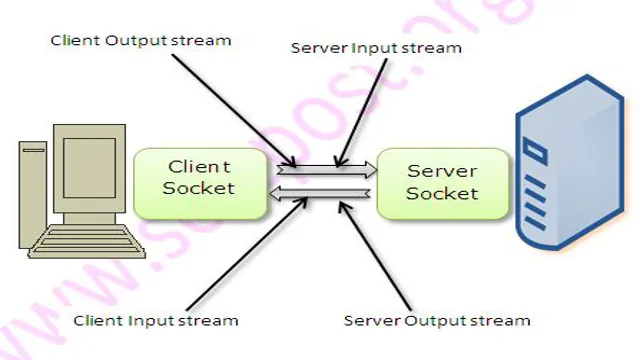
Have you ever experienced a slow or unresponsive socket connection in Java? It can be frustrating, especially when you’re working on time-sensitive tasks. The good news is that you can avoid this issue by setting a socket timeout in your Java code. Essentially, a socket timeout is the duration of time that a socket remains inactive before the connection is terminated.
By setting this timeout, you can ensure that your socket connections don’t stay open indefinitely, freeing up resources and preventing your program from hanging. In this blog post, we’ll explore how to set a socket timeout in Java and how it can benefit your programming projects.
What is a Socket Timeout?
Setting socket timeout in Java is an important feature that can prevent an application from getting stuck and waiting for a response from a host that might never arrive. Socket timeout is a duration limit that is set for receiving or sending data between two devices over a network. It is the amount of time that a socket operation will wait for a response before it throws an exception.
In Java, you can set the socket timeout by using the setSoTimeout() method that belongs to the java.net.Socket class.
By setting a socket timeout, you can specify how long a thread should wait for a response to arrive. This ensures that the application can continue execution if there is no response within the specified time limit. By using the setSoTimeout() method, you can easily control the time taken for socket operations, and ensure smooth execution of your Java application.
Definition and Functionality
A socket timeout is a setting that determines how long a program will wait for data to be sent or received over a network. It is essentially a timer that allows the program to move on if it does not receive a response within the allotted time frame. When a socket timeout occurs, the program can either try again (if the error is recoverable) or terminate (if the error is fatal).
Socket timeouts are crucial in network programming, as they help prevent programs from hanging indefinitely while waiting for data that may never arrive. Think of it as an invisible referee for network communication, making sure that everyone plays by the rules and follows the clock. With proper configuration, socket timeouts can help ensure that network traffic flows smoothly and that programs are not held up by unresponsive servers or slow connections.
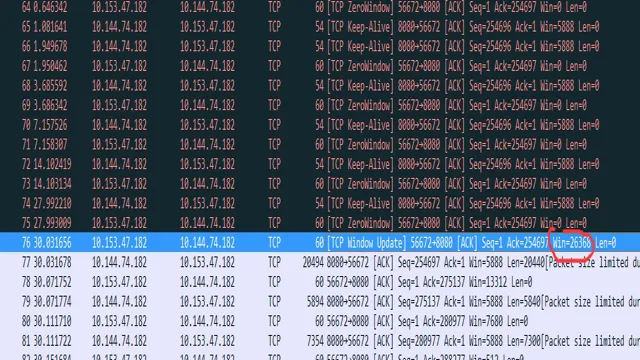
How to Set Socket Timeout in Java
Setting a socket timeout in Java is important for applications that rely on network communication. It allows the programmer to determine how long the socket should wait for data before timing out and returning an exception. To set a socket timeout, one can use the setSoTimeout() method which accepts the time in milliseconds.
This method is available on both Socket and ServerSocket classes. It’s crucial to note that the timeout value should be adjusted based on the network latency and size of data that is expected to be transferred. Setting an appropriate timeout value helps to improve the performance and reliability of your application.
So, if you’re wondering how to set socket timeout in Java, you can now use the setSoTimeout() method and set it to the value you deem necessary for your application.
Methods and Parameters for Setting Socket Timeout
Setting socket timeout is a crucial aspect of programming, especially in Java. Simply put, a socket timeout is the length of time a program waits for a response from a server before giving up. When dealing with network connections, it’s essential to set an appropriate timeout to ensure that the program doesn’t hang indefinitely.
There are two main methods to set socket timeouts in Java: setSoTimeout() and connectTimeout(). The former is used to set the timeout for read operations, while the latter is used to set the timeout for connection attempts. Both methods take an integer value representing the timeout duration in milliseconds.
It’s also possible to set timeouts using system properties. For example, you can use the “sun.net.
client.defaultConnectTimeout” property to set the default connection timeout. Overall, setting a socket timeout is a crucial aspect of network programming that can save developers countless headaches.
By implementing the appropriate timeout parameters, programs can handle unexpected network events gracefully and ensure maximum reliability.
Example Code: Setting Socket Timeout
If you are working with Java programming language, you might have come across the need to set a socket timeout. Whether you are building a client-server application or a program that communicates with remote servers, setting a socket timeout can be crucial in managing the performance and reliability of your application. In Java, setting a socket timeout is a simple process that involves defining the duration for which the socket should wait before throwing an exception.
This can be achieved using the setSoTimeout() method, which takes an integer value representing the timeout duration in milliseconds. By setting a socket timeout, you can prevent your application from getting stuck waiting for a response from a remote server that might be experiencing issues or simply taking too long to respond. Whether you are a beginner or an experienced Java developer, knowing how to set socket timeouts can help you build better, more robust applications.
Handling Socket Timeout Exceptions
Setting a socket timeout in Java is an important aspect of network programming. It lets you manage how long a thread would wait for data to be sent or received on a socket. When this time limit is exceeded, it triggers a `SocketTimeoutException`.
To set the timeout, use the `setSoTimeout()` method on a `Socket` object. The value you pass to it is the time in milliseconds that the thread should wait for data. If data is not received within this time, the exception is thrown.
This mechanism allows you to prevent your program from hanging indefinitely and quickly recover from network issues by handling the exception appropriately. Additionally, you can handle this exception by closing the socket and releasing any resources. Overall, setting the socket timeout is an important part of ensuring a robust network application.
Implementation and Best Practices
Socket timeout exceptions can be a common occurrence when working with sockets, and it’s important to handle them properly in order to ensure the reliability of your application. One best practice is to set a timeout value when creating a socket connection, which can prevent the socket from blocking for an indefinite amount of time. Another approach is to catch the SocketTimeoutException and retry the connection or take some other appropriate action.
It’s also important to consider the root cause of the timeout exception, which may be due to network latency or other external factors beyond your control. By implementing proper error handling and considering all potential factors, you can ensure that your application is able to handle socket timeout exceptions in a robust and reliable manner.
Conclusion
To wrap it up, setting socket timeout in Java is like giving your network communication a deadline – allowing you to gracefully handle any unforeseen delays or failures. It’s a simple yet impactful technique that can make your code more reliable and efficient. So don’t be shy, take control of your sockets and set those timeouts like a pro!”
FAQs
What is a socket timeout in Java?
Socket timeout is the amount of time a socket waits for an incoming response before throwing an exception. It is used to ensure that network connections do not hang indefinitely.
How do you set a socket timeout in Java?
To set a socket timeout in Java, you can use the setSoTimeout() method of the Socket class. You should call this method before making any network operations with the socket. For example, you can set a timeout of 10 seconds by calling socket.setSoTimeout(10000);
What exception is thrown when a socket timeout occurs in Java?
In Java, a SocketTimeoutException is thrown when a socket timeout occurs. This exception is a subclass of IOException and can be caught by a try-catch block.
Can you set a different socket timeout for read and write operations in Java?
Yes, you can set different socket timeouts for read and write operations in Java. You can use the setSoTimeout() method for read operations and the setSoWriteTimeout() method for write operations.
How do you handle a socket timeout exception in Java?
To handle a socket timeout exception in Java, you can catch the SocketTimeoutException using a try-catch block and take appropriate action, such as retrying the connection or reporting an error to the user.
What is the default socket timeout in Java?
The default socket timeout in Java is 0, which means that the socket will wait indefinitely for an incoming response. It is recommended to set a timeout to avoid network connection issues.
Can you change the socket timeout after it has been set in Java?
Yes, you can change the socket timeout after it has been set in Java by calling the setSoTimeout() method again with a new timeout value.