How to Put a Disc on an Angle Grinder – Tips and Tricks for Safe Cutting Blades
Do you need to cut through metal, concrete, or other tough materials? If so, an angle grinder is an essential tool for your arsenal. But without knowing how to put a disc on your angle grinder, you won’t be able to use it effectively. Putting a disc on an angle grinder may seem intimidating, but it’s easier than you may think.
You just need to follow a few simple steps. In fact, it’s like putting a key on a keychain — you insert the disc and turn it until it clicks into place. However, there are a few things to keep in mind to ensure you stay safe.
You should always wear personal protective equipment, such as gloves and safety glasses, to reduce the risk of injury. Additionally, make sure that the disc is compatible with your angle grinder to avoid any accidents or damages. In this guide, we’ll walk you through the steps to put a disc on your angle grinder, so you can start cutting through anything with ease.
Whether you’re a professional or a DIY enthusiast, we’ve got you covered. So grab your angle grinder and let’s get started!
Ensure Safety First
When it comes to working with an angle grinder, safety should always be your top priority. Putting a disc on the grinder is an essential step, but it can also be a dangerous one if not done correctly. First things first, make sure the grinder is unplugged before beginning.
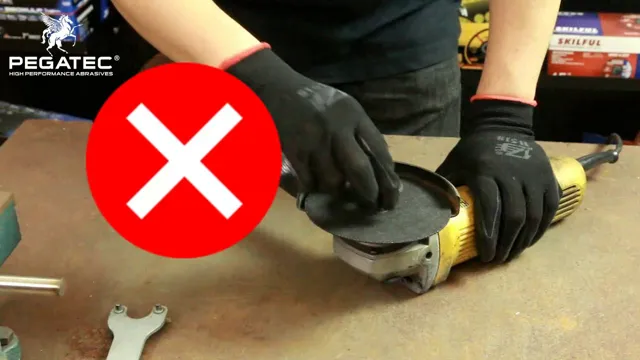
Inspect the disc for any cracks or damage, and ensure that it is the proper size for your grinder. Once you’ve verified that everything looks good, place the disc onto the spindle flange and secure it with the lock nut. It’s crucial to tighten the nut securely using the wrench provided, as a loose disc can fly off while in use and cause serious harm.
Remember, taking a few extra minutes to ensure proper disc placement and tightening is worth it when it comes to avoiding potential injuries.
Wear appropriate safety gear
When it comes to any activity that could pose a risk, safety should always be your top priority. One important step in ensuring your safety is wearing appropriate safety gear. Whether you’re riding a bike or working with power tools, having the right gear can make all the difference in preventing accidents or minimizing their impact.
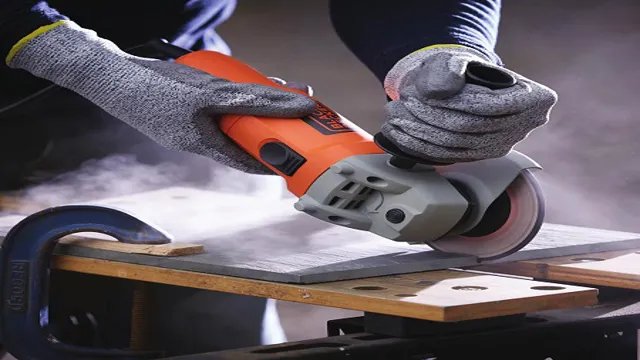
Some examples of essential safety gear include helmets, goggles, gloves, and hard hats. Not only can these items protect you from physical harm, but they can also provide peace of mind and boost your confidence when participating in potentially dangerous activities. Remember, investing in the right safety gear is always worth it in the long run, as it can help prevent serious injuries and even save lives.
So before you embark on your next adventure or task, always make sure to equip yourself with the proper safety gear.
Prepare the Angle Grinder
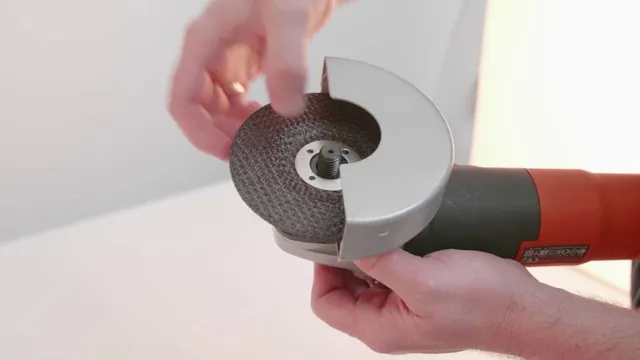
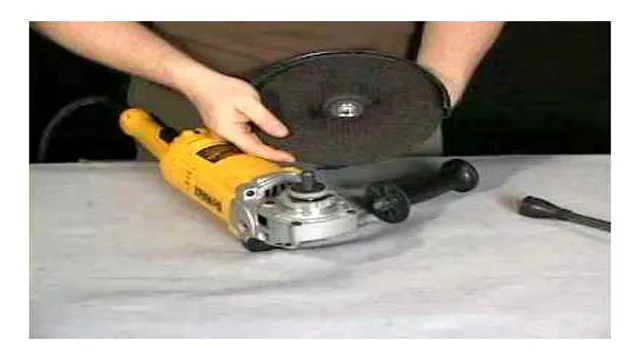
Putting a disc on an angle grinder can seem like a daunting task, especially if you’re new to DIY projects. But don’t worry, it’s actually quite simple! The first step is to prepare your angle grinder. Make sure it’s turned off and unplugged, then find the locking nut and depress the spindle lock – this will prevent the spindle from rotating.
Next, locate the spanner wrench that came with your angle grinder and use it to loosen the locking nut by turning it counterclockwise. Once the nut is loose, you can remove the old disc and replace it with the new one. Make sure the disc is facing the right way – the side with the label or markings should be facing up.
Tighten the locking nut by turning it clockwise and use the spanner wrench to ensure it’s secure. And that’s it – your angle grinder is now ready to use! With this simple process, you can confidently change out discs as needed and tackle more complex DIY tasks with ease.
Unplug the grinder
When you’re getting ready to use an angle grinder, the first step is to prepare it for use. One of the most important things you can do to get started is to unplug the grinder. This may seem obvious, but it’s an essential safety step that you should never forget.
Once you know the grinder is unplugged, you can begin to assemble it and make sure it’s set up exactly the way you need it to be. This includes checking the guard and positioning it correctly, selecting the right wheel for the job, and attaching the handle securely. By taking the time to prepare your angle grinder properly, you’ll ensure that it’s safe to use and that you can work efficiently without any unnecessary distractions or interruptions.
Remember to always put safety first and take your time when setting up your angle grinder, as it will save you time and trouble in the long run.
Choose the appropriate disc
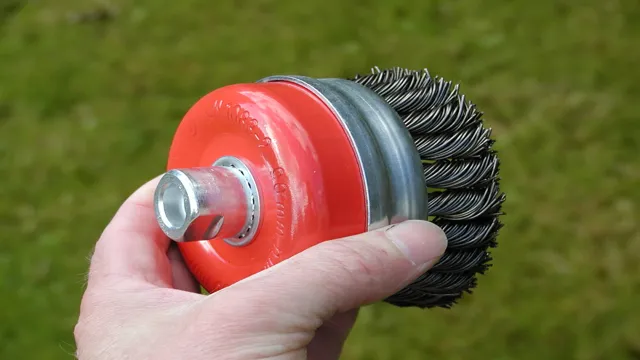
When it comes to using an angle grinder, one of the most important factors to consider is choosing the appropriate disc. Depending on the task at hand, you may need a cutting disc, grinding disc, flap disc, or sanding disc. Make sure to select the right disc for the job in order to maximize efficiency and safety.
Once you’ve chosen the correct disc, it’s time to prepare your angle grinder. Start by checking the disc for any cracks or damage before installing it onto the spindle. Tighten the nut securely, but not too tight, as you want to be able to remove the disc easily if necessary.
Next, adjust the guard to ensure it is in the correct position for the task you are about to perform. Before turning on the angle grinder, ensure you have all the necessary safety gear, including eye and ear protection and gloves. You should also position yourself in a safe and stable stance, with both feet firmly on the ground.
Finally, make sure you have a firm grip on the angle grinder and start it up slowly to avoid any accidents. In conclusion, preparing your angle grinder is an important step in ensuring a smooth and safe operation. By selecting the appropriate disc, checking for damage, and wearing the proper safety gear, you can successfully complete your task without any mishaps.
Remember to always approach an angle grinder with caution and respect, as it is a powerful tool that must be used correctly.
Attach the Disc
Putting a disc on an angle grinder may seem daunting if you have never done it before. Firstly, make sure the angle grinder is turned off and unplugged. Choose the appropriate disc for the task at hand and ensure it is compatible with your angle grinder.
Check to see that the diameter of the disc matches that of the grinder and the centre hole lines up with the spindle. Next, hold the spindle lock button located near the angle grinder’s head to prevent it from rotating. Carefully thread the arbor nut in a clockwise direction onto the spindle, ensuring that the disc is securely in place and seated evenly.
Use a wrench to tighten the arbor nut, but avoid overtightening as this could damage the disc. Double-check to see that the disc is secure before using the angle grinder for your task. Always wear protective gear and follow manufacturer’s instructions when operating an angle grinder.
Remember, safety comes first when using power tools!
Hold the spindle lock button
When it comes to attaching a disc to your power tool, it’s important to first hold down the spindle lock button. This button is typically located near the collet, and when pressed, it prevents the spindle from rotating. Holding this button down allows you to easily swap out the disc without having to worry about the spindle moving.
Once you have a good grip on the button, it’s time to attach the disc. Simply line up the holes on the disc with the holes on the spindle, and then secure it in place with the screw or other fastener provided. It’s important to make sure the disc is centered and secure before starting your power tool.
By taking these simple steps, you can ensure that your disc stays in place and doesn’t move around while in use, resulting in a safer and more efficient work environment. So next time you need to attach a disc, remember to hold down that spindle lock button and securely fasten it in place.
Unscrew the flange nut
To attach a disc to your power tool, you’ll need to unscrew the flange nut. The flange nut is responsible for keeping the disc securely in place, so it’s essential to take your time when removing it. Start by unplugging the tool from the power source to prevent any accidents.
Then, locate the flange nut on the spindle and use the appropriate wrench to loosen it. Turn the wrench counterclockwise until you can easily remove the nut by hand. Once the flange nut is removed, you can place the disc onto the spindle.
Make sure the disc is properly aligned with the spindle before screwing the flange nut back on. Tighten the nut as much as possible by hand before using the wrench to give it a final turn. And there you have it, your disc is now attached and ready for use.
Remember to always work carefully with power tools to ensure the safety of yourself and those around you.
Place the disc on the spindle
Attaching a disc to a spindle might seem like a simple task, but it’s essential to do it properly to avoid any damage to the disc or the player. First, ensure that the disc is clean and free of any dust or debris before handling it. Then, locate the spindle in the center of your CD or DVD player.
Carefully place the disc on the spindle, ensuring that it sits snugly in place. Sometimes the player might have a mechanism to secure the disc, so if this is the case, ensure that it’s properly locked in place before playing. By taking the time to properly attach the disc to the spindle, you’ll ensure that it’s safely and securely in place, providing a clear and flawless listening or viewing experience.
Align the disc to the marks on the grinder
When it comes to using an angle grinder, it’s important to properly attach the disc to ensure a safe and effective grinding experience. Before attaching the disc, make sure your grinder is unplugged and turned off. Begin by selecting the appropriate disc for the job.
Align the disc to the marks on the grinder, making sure it is centered and flush against the spindle. Next, thread the locking nut on to the spindle and use the locking tool to securely tighten the nut. It’s important to avoid over-tightening the nut as this can cause the disc to warp or crack.
Double-check everything is securely in place before turning on your grinder. Remember, safety first! By taking the time to properly attach the disc, you’ll ensure a smooth and efficient grinding experience that won’t compromise your safety.
Screw on the flange nut
Once you’ve attached your disc onto your grinder, it’s time to screw on the flange nut. This nut holds the disc securely in place, ensuring that it won’t fly off during operation. To screw it on, you’ll need to use the provided wrench and turn it clockwise until it’s tight.
Don’t over-tighten, though, as this can cause the disc to become warped and potentially dangerous. Remember, safety always comes first when using a grinder, so make sure to follow all manufacturer’s instructions and wear protective gear. By attaching the flange nut correctly, you’ll be able to operate your grinder with confidence and ease.
Test the Disc
Putting a disc on an angle grinder can be a bit tricky for beginners, but with practice, it becomes easy. First off, you need to ensure that your grinder is unplugged from the power source to avoid any accidents. Next, you need to find the arbor nut, which is usually located beneath the guard.
Once you locate it, use a wrench to loosen the nut and slide the disc onto the spindle, ensuring that it aligns with the symbols on the grinder. Tighten the arbor nut firmly, but avoid overtightening it as it could damage the disc or the tool. Finally, test the disc before use by holding the tool gently and turning it on.
If the disc vibrates or wobbles, turn off the grinder and repeat the process to secure the disc properly. With these simple steps, you can easily put a disc on an angle grinder and be ready for your next project.
Hold the angle grinder firmly and turn it on
When it comes to using an angle grinder, safety should always be your top priority. Before getting started, it’s essential to test the disc to ensure it’s properly aligned and secure. One way to do this is to hold the angle grinder firmly and turn it on for a few seconds.
If the disc wobbles or vibrates, it’s not properly secured and needs to be adjusted. Always wear personal protective equipment such as goggles and earplugs to prevent injuries from flying debris and noise. It’s also advisable to use a clamping device or vise to hold your workpiece securely when using the grinder.
By following these safety measures, you can prevent accidents and perform tasks more efficiently. Remember to always practice proper handling and maintenance of your angle grinder to prevent mishaps and prolong its lifespan.
Inspect the disc for any wobbling or misalignment
When inspecting a disc, it’s important to test it thoroughly to ensure optimal performance. One crucial step is to check for any wobbling or misalignment. This can occur due to a variety of reasons, such as the disc being improperly balanced, uneven application of pressure during manufacturing, or physical damage.
To test for wobbling, place the disc on a flat surface and spin it gently. If it wobbles or appears to be tilted, it may need to be replaced or repaired. Misalignment, on the other hand, is when the disc has become warped or bent.
This can cause skipping, freezing, or other playback issues. To test for misalignment, visually inspect the disc for any visible signs of warping or bending. If you notice any issues, it’s best to replace the disc or have it professionally repaired.
By carefully testing your discs, you can ensure that they continue to function properly and provide optimal viewing or listening experiences.
Make adjustments as necessary
After burning an optical disc, the final step is to test it to ensure it works correctly. All too often, we assume the disc is fine without actually checking. It might have errors that cause it to skip, freeze, or crash.
When you insert the disc, open its contents, and run the disc’s media, watch how it plays and get an idea of any problems that occur. This way, you can adjust what needs fixing to get the best performance from your disc. For instance, try to play the disc on several players.
If it only fails on one player, then it could be the player and not the disk. On the other hand, if the disc has trouble playing on multiple devices, it might have errors and needs an adjustment. Don’t be afraid to try different solutions if you have issues with your disc.
Learn to troubleshoot as necessary, and don’t hesitate to make adjustments to fix the problem. With adequate tests, you can guarantee that your disk is perfect for sharing, saving, and more.
Conclusion
In conclusion, putting a disc on an angle grinder is like giving your tool a new look. It’s a simple process that requires precision and attention to detail. Just remember to keep your fingers clear, tighten the nut, and don’t go overboard on the pressure.
With a little bit of practice, you’ll be spinning discs like a pro in no time. Happy grinding!”
With these steps, you can safely and easily put a disc on your angle grinder.
If you’ve just purchased an angle grinder, you’re probably eager to start using it on your various projects. However, before you start, it’s important to know how to safely and easily put a disc on your angle grinder. One vital step in this process is to test the disc before use.
To do this, you want to ensure that the disc is securely attached to the grinder without any wobbling or looseness. Turn on the grinder and hold it steady to see if the disc vibrates. If it does, turn off the grinder and readjust the disc until it’s stable.
You also want to check for any visible cracks or damage on the disc. Performing these simple tests can save you from potential hazards while using your angle grinder. So, take your time when positioning the disc and always prioritize safety.
FAQs
What are the steps for putting a disc on an angle grinder?
First, disconnect the power source. Then, remove the lock nut and depressing the spindle lock button. Place the disc onto the spindle and align with the fixing hole. Tighten the lock nut using the wrench provided.
What kind of disc should I use for an angle grinder?
It depends on the material you’re working with. For cutting, use a cutting disc. For grinding and polishing, use a grinding disc. Always make sure the disc is compatible with your angle grinder.
Is it necessary to wear protective gear when using an angle grinder?
Yes, it is highly recommended to wear protective gear when using an angle grinder. This includes safety glasses or goggles, gloves, a dust mask, and ear protection.
How often should I replace my disc?
It depends on the frequency and intensity of usage. If you notice any wear and tear, cracks, or chips on the disc, it’s time to replace it. It’s recommended to inspect the disc before each use to ensure it’s in good condition.
How do I choose the right angle grinder for my project?
Consider the size of the project, the material being worked on, and the type of disc needed. Smaller projects may only require a 4 or 4.5-inch grinder, while larger projects may require a 7 or 9-inch grinder. Make sure the grinder has the necessary power and speed for the task at hand.
How do I maintain my angle grinder?
Regularly clean the tool and disc to prevent debris buildup. Keep the gears lubricated and check for any loose or damaged parts. Store the tool in a dry, cool location and inspect it before each use.
What safety precautions should I take when using an angle grinder?
Always disconnect the power source before changing the disc. Never wear loose clothing or jewelry. Keep a firm grip on the tool and maintain a safe distance from others. Avoid using the grinder in wet or damp conditions.